

After evaluating 14 human resources software platforms, I chose Rippling as the best HR software overall. BambooHR is best for small businesses, Gusto is a strong option for companies that need HR software with payroll, and ADP Workforce Now is best for midsize companies.
This HR software comparison summarizes each platform’s best use case, starting price, key features, and overall score.
Vendor | Best for | Starting price |
|---|---|---|
Best overall; automating cross-functional workflows | $40/mo. + $8/employee/mo.* | |
Small companies prioritizing ease of use | $10.25/employee/mo. | |
New businesses looking for payroll-first HR tools | $49/mo. + $6/employee/mo. | |
Midsized businesses needing a scalable HR software | Contact sales | |
Large enterprises with complex HR operations | $18/user/mo.** | |
Companies with field and frontline staff | Contact sales |
*Pricing is for small businesses. Rippling also allows you to create a custom package with the features you want.
**Starting price for SAP SuccessFactors HCM’s Core HR module.
What is human resources software?
Human resources (HR) software helps businesses manage employee information and processes such as payroll, recruiting, onboarding, benefits, performance, and compliance. Also called HR software, human resource software, or HR management software, these platforms automate administrative work and centralize employee management.
At its core, HR systems provide a secure database of employee data and a centralized view of the workforce. It also helps HR teams effectively manage each stage of the employee life cycle.
The right HR software solution can help optimize processes by automating manual tasks, organizing employee records, and building data-driven reports. Moreover, advanced HR software solutions enable better workforce planning, financial forecasting, and strategic decision-making.
Best HR software comparison
| Our score (out of 5) | Ease of use | Extensive HR suite | Core HR in basic plan* | Payroll in basic plan | |
|---|---|---|---|---|---|
| Rippling Visit website | 4.18 | Moderate | ✓ | ✓** | ✓** |
| BambooHR Visit website | 3.8 | High | Moderate | Time tracking costs extra | Paid add-on |
| Gusto Visit website | 3.65 | High | Moderate | Time tracking in higher tiers | ✓ |
| ADP Workforce Now Visit website | 3.6 | Moderate | ✓ | Time tracking in higher tiers | ✓ |
| SAP SuccessFactors HCM Visit website | 3.56 | Low | ✓ | ✓ | Paid add-on |
| Paycor Visit website | 3.56 | Moderate | ✓ | Time tracking in higher tiers | ✓ |
*Includes new hire onboarding, employee database, time tracking, and self-service tools
**Depends on modules or features selected
The best HR software isn’t just the platform with the longest feature list. It’s the system that matches how your business actually runs. To narrow the options, I’d start with the operational problem you’re trying to solve.
If payroll and tax compliance are the main issues, Gusto or ADP Workforce Now may be the better fit. If your team primarily needs employee records, self-service tools, and fast adoption, BambooHR is stronger. Rippling makes more sense when HR work connects with IT, finance, and global operations, while SAP SuccessFactors is best reserved for enterprise-level HCM needs.
Need Help? Talk to an HR Software Advisor
Update notes
- Aug 27, 2026: Robie Ann Ferrer updated pricing and product information, simplified provider explanations, and clarified product strengths, limitations, and selection guidance.
- July 27, 2026: Hanna Sillo updated the article’s headings and discussions. She also added a new “How to choose HR software” section covering company size, essential functions, total cost, integrations, and scalability.
- May 07, 2026: Robie Ann Ferrer made minor edits and format adjustments throughout the article to improve readability. She also updated the “What’s new” section to highlight new features or software improvements.
- Mar. 17, 2026: Robie Ann Ferrer revised the comparison table to provide better use case scenarios for the HR systems included in this guide. She also updated the article to reflect new research data and enhanced the feature sections of each software to help you make an informed purchasing decision.
- Feb. 27, 2026: Robie Ann Ferrer added a “What’s new” section to highlight product updates and feature enhancements that the software providers on our list introduced for the month. For February, this section contains updates from Rippling and BambooHR.
- Jan. 08, 2026: Robie Ann Ferrer used an updated scoring rubric and added Namely and Zoho People to the list of software evaluated. While Rippling and BambooHR retained their top spots, Gusto moved up to third place. Robie also made some revisions to the article to improve readability, as well as reflect rubric score changes and up-to-date pricing information.
2025
- Nov. 5, 2025: Hanna Sillo added user reviews for Rippling, BambooHR, ADP Workforce Now, SAP SuccessFactors HCM, and Gusto for practical insights.
- Jul. 15, 2025: Robie Ann Ferrer used a revised version of the original scoring rubric to compare 12 HR software. Trinet HR Platform was initially included, but she dropped it because TriNet has incorporated it into its HR Plus outsourced services. Then, she evaluated the dozen options on the list. As a result, Rippling replaced ADP Workforce Now as the best software for HR. Gusto also moved up from the honorable mentions list, while Deel didn’t make the top five. Finally, Robie made revisions throughout the article to reflect rubric score adjustments and added up-to-date product information for all vendors.
- Apr. 25, 2025: Hanna Sillo reviewed the pricing and fixed formatting errors on the page.
- Mar. 7, 2025: Hanna Sillo added a downloadable rubric and fixed formatting errors on the page.
- Jan. 31, 2025: Jessica Dennis evaluated old and new software and revised this page for 2025. Following an updated all-in-one HR evaluation rubric, she replaced Gusto with Deel as the best HR software for startups. She also dropped Workday HCM from her honorable mentions and replaced it with Paycor and Gusto.
- Beyond this, Jessica also reviewed the copy for accuracy and provided fresh analysis and expert insights to help with your purchasing decision.
2024
- Oct. 11: Robie Ann Ferrer updated SAP SuccessFactors’ pricing, added details on Gusto’s Al tool Gus, and reviewed the pros and cons for accuracy.
- Jul. 18: Jessica Dennis updated platform scores following the changes to module inclusion scoring, adjusted criteria weights, and added Paylocity and Deel to her honorable mentions, replacing Paycor.
- Jun. 10: Jessica Dennis adjusted scores across all platforms due to changes in performance management scoring, updated user review weighting, and new feature evaluations for Bob’s Hiring and Rippling’s Goals and News Feed modules.
- Apr. 30: Jessica Dennis adjusted each vendor’s scores following minor changes in our rubric for user ratings and how we score module inclusions.
- Jan. 22: Jessica Dennis added honorable mentions for Workday HCM and Paycor and corrected the overall score for Gusto after further research confirmed it lacks tools in its ATS for managing in-app interview scheduling.
2023
- Dec. 29: Jessica Dennis reevaluated our top choices for 2024 with an objective scoring rubric. As a result, Rippling replaced Namely as our pick for midsize companies, and Gusto replaced Bob for startups.
Methodology
To evaluate the best human resource software, I used a 73-point rubric to review and compare 14 HR platforms. My options included:
- ADP Workforce Now
- Rippling
- SAP SuccessFactors HCM
- UKG Ready
- BambooHR
- Bob
- Gusto
- Workday HCM
- Paycor
- Paylocity
- Deel
- Paychex Flex
- Zoho People
- Namely
I looked for functionalities that streamline essential HR processes, from recruiting and payroll to performance reviews and learning management. In addition to checking customer support options, I compared each provider’s compliance tools, reporting, third-party integrations, automation, and customization capabilities.
I also added my expert rating to each criterion, where I considered the effectiveness of that area or feature. Then, I narrowed down the list to my top five recommendations (plus one honorable mention).
Below is the breakdown of the evaluation criteria.
- HRIS and onboarding (13%): This section covers each platform’s human resources information system (HRIS) and onboarding features. Systems scored higher when their employee database functioned as a centralized HR record instead of simply storing payroll data. I also awarded additional points for employee self-service tools.
- Payroll and benefits (12%): I looked for built-in payroll and benefits capabilities, automated tax filing, employee benefits enrollment, compliance support, and tools that improve the employee experience.
- Pricing (15%): Platforms with transparent pricing, scalable packages, discounts, no long-term contracts, and free trials scored higher. I also considered value for money, including how much useful functionality companies receive at each price level.
- Platform and interface (13%): In this category, I evaluated usability, workflow automation, permissions, employee-data security, built-in functionality, and integrations with other business software.
- Workforce management (12%): This criterion looks at features that monitor when, where, and how your staff works. I checked whether each platform offered time tracking, scheduling, leave management, approvals, automation, and compliance controls for workforce regulations such as the FMLA and FLSA.
- Talent acquisition (11%): This criterion covered each HR system’s recruiting capabilities, including candidate sourcing, screening, interview management, resume parsing, applicant tracking, AI capabilities, and candidate-engagement tools.
- Employee relations (11%): In this category, I focused on performance management, learning, employee engagement, recognition, goal tracking, communications, and other tools that support employees after hiring.
- AI, analytics & reporting (8%): Here, I looked for useful AI capabilities across HR workflows along with standard and customizable reporting, templates, dashboards, and data-export options.
- Support (5%): This examines the various technical support options available to users, such as live chat, phone, and email assistance. Platforms with comprehensive FAQs and knowledge bases ranked higher, and I also considered whether vendors offered business services like HR outsourcing to help companies offload administrative tasks.
Why you can trust my advice
To create this guide, I evaluated 14 HR software across nine core categories: HRIS and onboarding, payroll and benefits, workforce management, talent acquisition, employee relations, AI tools and reporting, platform and interface, customer support, and pricing. I narrowed the list using a 73-point rubric to keep comparisons consistent.
My recommendations are also informed by more than eight years of researching and evaluating HR software for small and midsize businesses, along with 10 years of HR experience handling HRIS, time tracking, and pay processing systems. That experience helps me look beyond individual features and consider how a platform will actually fit into an HR team’s day-to-day work.
Robie Ann Ferrer
Payroll & HR Software Expert at TechnologyAdvice

Rippling: Best overall HR software
Pros
- Employee profile translation and localization for more than 150 countries.
- Finance and IT management tools available
- Global payroll, employee of record (EOR), and professional employer organization (PEO) services
- Advanced reporting with customizable formulas
- Strong workflow automation across multiple business functions
Cons
- There is no free trial, and it may be too expensive for basic HR needs.
- New users may need time to learn how to navigate through all its features.
- Scheduling requires the purchase of the Time and Attendance module.
- Lacks direct phone support; you need to request a virtual call through its chat tool
Why I chose Rippling
Rippling earned my top overall spot because it connects HR work with systems outside the HR department. Employee data can feed payroll, IT access, device management, spending, and other processes, which becomes more valuable as a company grows and responsibilities spread across teams.
What separates Rippling from simpler HR platforms is its workflow automation. Administrators can set up rules that trigger paperwork, payroll tasks, software access, equipment setup, and approvals from a single event, such as hiring or offboarding an employee. That flexibility contributed to its 4.18 out of 5 score in my evaluation.
That breadth can also make Rippling more expensive and complex than some businesses need. Its modular pricing means costs rise as you add payroll, recruiting, time tracking, or other products. I’d shortlist it for companies expecting more complicated HR workflows, but BambooHR or Gusto may be a better fit when the priority is straightforward HR administration.
What makes Rippling stand out?
- Custom workflow automation: Rippling’s Workflow Studio can trigger HR, payroll, IT, and finance tasks from the same employee event. For example, hiring someone can start paperwork, payroll setup, software access, equipment requests, and approvals without HR coordinating every step manually.
- Unified HR, IT, and finance platform: Rippling combines employee data, payroll, app access, device management, and spend controls in one system. Compared to Gusto or BambooHR, which focus primarily on HR, this broader scope helps reduce system sprawl as companies grow.
- Global workforce management: Rippling supports global payroll, EOR services, and international workforce management. This makes it a stronger choice than Gusto for organizations that want more global services directly from the same provider.
- Compliance support: Rippling is one of the strongest HR software options for compliance because Compliance 360 monitors potential federal, state, and local labor-law issues and connects alerts to everyday HR workflows. While ADP also offers strong compliance support, Rippling embeds this more directly into day-to-day workflows rather than treating it as a separate service layer.
- New hire assessment: Rippling’s AI-powered tool, Talent Signal, analyzes a new hire’s first 90 days and surfaces performance trends. This allows managers to step in earlier instead of waiting for formal performance or new hire reviews. Rippling currently describes the tool as an Early Access offering, so availability may be limited.
Gallery

Rippling’s Compliance 360 dashboard. Source: TechnologyAdvice 
Creating a custom workflow in Rippling’s Workflow Studio. Source: TechnologyAdvice 
Rippling’s scheduling dashboard. Source: TechnologyAdvice 
Rippling’s news feed. Source: TechnologyAdvice 
Rippling’s candidate dashboard. Source: TechnologyAdvice 
Rippling global payroll dashboard. Source: TechnologyAdvice 
Rippling reports and analytics. Source: TechnologyAdvice 
Rippling organizational chart. Source: TechnologyAdvice 
Rippling homepage. Source: TechnologyAdvice
How is Rippling priced?
Rippling’s package for small businesses starts at $40 per month, plus an $8 per employee, per month (PEPM) fee. It comes with access to the system’s base product, Rippling Platform, which includes reporting, custom workflows, role-based permissions, and manager approvals. While Rippling’s small business page hints that it also features benefits administration and payroll (as of this writing), I recommend contacting the provider to request a quote.
This modular structure is one of Rippling’s biggest strengths, but it also makes total cost difficult to compare using the starting price alone. I recommend requesting an itemized quote using the exact functions you need, especially when comparing Rippling with a product such as Gusto that includes payroll in its starting plan.
What users say about Rippling
“It’s not cheap, but if you’re running a lean team and need to stay compliant across time zones, it more than earns its keep.“
Santiago Nestares at Dualentry notes that Rippling has become one of the few systems their remote, global team relies on daily, simplifying the complexities of international hiring, payroll, and compliance.
However, he adds that the platform isn’t cheap, and some countries require extra setup. Still, it’s a trade-off they find worthwhile for a remote-first company that needs dependable global coverage.
Meanwhile, many reviews on G2 and Capterra highlighted Rippling’s easy-to-use all-in-one platform. Users like that it automates HR and IT processes, has solid reporting tools, and an extensive integration ecosystem.
However, some reviewers said that learning to use its features takes time, especially if you get several modules. A few others mentioned that while its support team is generally helpful, the response time can be slow when dealing with technical issues.
At the time of publication, Rippling reviews earned the following scores on these websites:
- G2: 4.8 out of 5
- Capterra: 4.9 out of 5
Is Rippling the right fit?
Rippling is one of our favorite HR software vendors, featuring in many of our top product pages. For more information about its capabilities, check out some of our articles below:
- Best Human Resources Management Software (HRMS)
- Best Contractor Payroll Software
- Best Global Payroll Solutions
- Best HR Outsourcing Companies
- Best Employer of Record (EOR) Services

BambooHR: Best HR software for small businesses
Pros
- User-friendly interface that’s easy to navigate
- Comprehensive HRIS with strong reporting tools
- Customizable homepage and profile dashboards.
- Automated wellbeing surveys to track employee happiness over time.
Cons
- Payroll, time tracking, and benefits modules cost extra
- Total pricing can increase substantially after add-ons
- EOR is a paid add-on and is available through BambooHR Employer of Record, powered by Remote
- Compensation tools and HR benchmarks are limited to the highest tier.
Why I chose BambooHR
BambooHR strikes a useful balance between functionality and ease of use. It covers core HR needs without presenting employees and administrators with an overly complicated system, which is important when a small HR team may not have time for extensive training or configuration.
In my evaluation, BambooHR scored 3.8 out of 5 overall and performed particularly well for usability. Common tasks such as requesting PTO, reviewing employee information, and completing onboarding steps were easy to find. Its core platform also gives employers room to add performance, compensation, payroll, benefits, and time tracking as their needs grow.
While BambooHR offers a wide range of HR tools, pricing can be a drawback. Its plans include hiring and talent management modules, so you have to pay extra for must-have HR system features, such as payroll, time tracking, and benefits administration. I’d favor BambooHR when employee adoption and uncomplicated HR processes matter most, while Rippling is better suited to companies that need deeper automation.
What makes BambooHR stand out?
- Compensation benchmarking: Its integration with Mercer allows BambooHR to provide compensation insights based on company size, industry, and location, along with tools for planning and approvals. This gives smaller HR teams more structure for pay decisions without moving into enterprise-level platforms like SAP.
- AI-powered feedback insight: BambooHR uses AI to summarize employee feedback and surface themes from reviews and surveys, such as its employee Net Promoter Score (eNPS) topic summaries. This helps you identify sentiment trends faster and act on engagement data earlier.
- Digital document management and recordkeeping: The platform offers a more straightforward option for organizing HR documents. You can upload, share, and store company and personal files, as well as create legally recognized online forms that support electronic signatures.
- Employee self-service: Like most modern HRIS, its employee self-service portal includes preboarding checklists, benefits enrollment, paystub access, and time tracking tools. Employees can also update their information, update professional goals, and track training assignments from the same place.
- Salary bands, levels, and total rewards visibility: BambooHR includes built-in levels and bands for salary structure plus total rewards statements, giving employers a clearer framework for pay decisions and helping employees understand more than base salary alone.
Gallery

Creating a job opening in BambooHR. Source: TechnologyAdvice 
Employee profile in BambooHR. Source: TechnologyAdvice 
Modifying forms for eSignature in BambooHR. Source: TechnologyAdvice 
Creating a goal in BambooHR. Source: TechnologyAdvice 
BambooHR hiring dashboard. Source: TechnologyAdvice 
BambooHR employee directory. Source: TechnologyAdvice 
BambooHR employee turnover dashboard. Source: TechnologyAdvice 
BambooHR homepage. Source: TechnologyAdvice 
BambooHR’s analytics and employee wellbeing reports provide insight into worker happiness and engagement. Source: TechnologyAdvice.
How is BambooHR priced?
BambooHR pricing starts at $10 per employee monthly, but fees are based on the number of employees you have. If you have 25 or fewer workers, you get a flat monthly rate. If you have more than 25 employees, BambooHR will charge a PEPM fee.
It has three plans: Core, Pro, and Elite. The starter plan includes basic HR features for hiring, onboarding, time off and benefits tracking, compliance, and employee information management. You are granted access to additional tools, such as compensation and performance management, when you upgrade to higher tiers.
Add-on modules are also available if you want to add employee time tracking, payroll, and benefits administration to your plan. And if you decide to get both payroll and benefits, BambooHR offers a 15% discount for that bundle (as of this writing).
Since our last update, BambooHR has introduced an EOR module (powered by Remote) add-on for companies that need help hiring and paying international employees. Its features include a global employment cost calculator and automatic two-way data syncs between BambooHR and Remote’s HR systems.
BambooHR plans
| Core | Pro | Elite |
|---|---|---|
| Starts at $10 PEPM. | Starts at $17 PEPM. | Starts at $25 PEPM. |
| Includes: • HR data and reporting • Hiring and onboarding Time off and benefits tracking • Employee satisfaction and feedback tools • HR intelligence and AI-powered analytics • Compliance alerts, templates, and how-to guides • One compliance course • Access to over 150 pre-built software integrations • Flexible Custom Report Builder | Everything in Core, plus: • Performance reviews • Employee Community tool with a centralized communications hub for updates, interest groups, and announcements • Upgraded AI tools • 15 compliance courses • Embedded EasyLlama courses • Time Kiosk app and physical time clock support | Everything in Pro, plus: • Salary benchmarking and compensation planning • Access to HR benchmark data • Custom dashboards and analytics • Premium support services • Advanced AI tools • Over 300 compliance courses |
What users say about BambooHR
“[I]t was one solution my CEO pointed out that was a game-changer for our company. It was a single point of truth for us and made life so much more transparent (which was badly needed) and personnel management easier.”
Amy Leger, CEO at 1Eleven Group, notes that BambooHR was a “game-changer” during her tenure as COO of a small communications agency, where she previously managed hiring, offboarding, staff reviews, and time off manually.
She says it brought long-needed transparency to hiring, onboarding, goal setting, and performance reviews, all in one platform. But she adds that setup was “pretty clunky” and not very intuitive for administrators, even though employees found it simple once configured.
Amy also shared one wish for improvement: a more granular time-tracking feature for client work. Still, Amy says BambooHR’s automation and organization made it one of the best decisions she made for her team.
On popular review sites such as G2 and Capterra, reviewers said its user-friendly platform centralizes HR data and helps them stay compliant. However, some users complained about occasional software glitches when clocking in or filing leaves.
At the time of publication, BambooHR reviews earned the following scores on these websites:
- G2: 4.4 out of 5
- Capterra: 4.6 out of 5
Why is BambooHR so popular?
BambooHR is a versatile HR suite that can efficiently handle the employee life cycle. Because of its wide range of features, intuitive platform, and user-friendly interface, it appears in many of our buyer’s guides, such as:
- Best HRIS
- Best Employee Onboarding Software
- Best Leave Management Software
- Best HR Software for Small Companies
- Best HRMS
- Best HR apps

Gusto: Best HR software for new businesses
Pros
- User-friendly interface
- Gusto-brokered health insurance integrated with all payroll plans
- Global contractor payroll services
- Access to EOR services through Remote
Cons
- Advanced HR features like applicant tracking and performance reviews reserved for higher plans
- The starter plan is only for single-state pay runs
- Same-day and instant payments cost extra
- Less suited to highly complex HR workflows and reporting
Why I chose Gusto
A new business often needs payroll to work well before it needs an elaborate HR system, which is where Gusto fits best. It combines payroll with onboarding, benefits, employee records, and other basic HR tasks in an interface that doesn’t ask a first-time employer to become an HR technology expert.
That simplicity showed up in my evaluation. Gusto scored 3.65 out of 5, helped by transparent pricing and an easy-to-follow experience across payroll, benefits, and employee administration. It can also take several payroll-related compliance tasks off a new employer’s plate, including tax filings and new-hire reporting.
The fit changes as HR requirements become more sophisticated. Recruiting, performance, analytics, and workforce-management tools are less extensive than what a broader human capital management (HCM) platform provides, and some capabilities require higher tiers or add-ons. Gusto makes the most sense when payroll is the anchor; companies already managing complex HR processes may get more runway from Rippling or ADP Workforce Now.
What makes Gusto stand out?
- Full-service payroll: Gusto runs payroll and automatically handles federal, state, and local tax filings. Compared with Rippling and ADP Workforce Now, it offers a simpler, more guided setup that’s easier for new and small businesses to manage.
- Automated pay runs and compliance workflows: Gusto automates pay calculations and compliance-related tasks behind the scenes. If you don’t expect any changes to your payroll, you can activate its automatic pay run feature that starts and completes the process for you. These help reduce manual work and avoid errors tied to tax filings.
- Integrated benefits: Gusto simplifies the benefits setup by acting as a licensed health insurance broker, offering access to a wide range of medical, dental, and vision plans. You don’t need to bring your own broker, although Gusto lets you do that for a fee. It can help you compare plans, enroll employees, and stay compliant with benefits-related regulations.
- Employee onboarding and self-service setup: The platform supports offer letters, onboarding checklists, tax forms, and employee self-service in one system, making it easier to standardize hiring and onboarding without adding extra tools.
- Gusto Wallet: Gusto provides employees access to pay, savings tools, and financial insights through a mobile app. This adds a practical financial wellness layer that supports employee experience.
Gallery

Gusto follows a four-step process for running payroll. Source: Gusto. 
You can easily add, delete, resize, and move pay columns with Gusto’s customizable payroll spreadsheet. Source: Gusto. 
Gusto connects with popular productivity and business apps. Source: Gusto. 
Gusto has an onboarding checklist you can easily customize to fit your requirements. Source: Gusto. 
Gusto Wallet allows employees to monitor their earnings, giving them a better understanding of their finances month-to-month. Source: Gusto.
How is Gusto priced?
Gusto pricing starts at $49 monthly plus $6 PEPM. It offers three plans: Simple, Plus, and Premium. There’s also a contractor-only payroll package that costs $35 monthly plus $6 per contractor per month*. Like the other human resource management software on my list, Gusto has add-on tools and services if you want to enhance your selected plan’s features.
Gusto plans
| Simple | Plus | Premium |
|---|---|---|
| $49/mo. + $6 PEPM | $80/mo. + $12 PEPM | $180/mo. + $22 PEPM |
| Includes: • Unlimited single-state full-service payroll • Auto-run payroll • Two- and four-day direct deposits • Basic support • Employee self-service • Gusto-brokered health insurance • New hire self-onboarding • Basic PTO policies • Custom admin permissions • Reports for payroll and time off • Email provisioning and deprovisioning tools | Everything in Simple, plus: • Unlimited multi-state full-service payroll • Next-day direct deposits • Job postings and applicant tracking • PTO management • Time tracking and scheduling • Time kiosk • Software provisioning and deprovisioning • Reimbursement and expense claim management • Workforce costing and custom reports • Employee directory and printable org charts | Everything in Plus, with: • Dedicated customer success manager • HR templates for handbooks, job descriptions, and policies • Proactive federal and state labor law compliance alerts • Access to certified HR experts • Full-service payroll migration and account setup • Health insurance broker integration • R&D tax credit discount • Priority support |
Gusto contractor-only plan
- Monthly fee: $35 plus $6 per contractor*
- Includes unlimited US contractor payments, four-day direct deposits, and 1099-NECs at the end of the year
Add-ons
For the Simple plan only (free with the Plus and Premium tiers)
- Next-day pay: $15/mo. + $3 PEPM
- Time tracking: $6 PEPM
- Performance reviews: $3 PEPM
For the Simple and Plus plans only (free with the Premium tier)
- Priority support: $30/mo. + $3 PEPM
- HR resources: $50/mo. + $5 PEPM; includes compliance alerts and access to HR experts and HR templates
For all plans
- Same-day pay: $90 per payroll
- Instant pay: $100 per payroll
- State tax registration: Prices vary by state
- R&D tax credits: Pay 15% of identified tax credits
- Health insurance broker integration: $6 per month per eligible employee
- 401(k) retirement savings: Price varies by 401(k) integration
- Health Savings Accounts (HSAs): $2.50 per month per participant**
- Flexible Spending Accounts (FSAs): $4 per month per participant, with a $20 per month minimum**
- Dependent care FSAs: $4 per month per participant, with a $20 per month minimum**
- Commuter benefits: $4 per month per participant, with a $20 per month minimum**
- Workers’ compensation: Price of premiums only
- International contractor payments: Price varies by foreign exchange rate, with a $5 per-payment fee to US-based bank accounts
- Gusto Money Plus: $19 per month; includes tools for managing company funds for payroll, invoicing, and bill payments
*For new clients, Gusto waives the $35 monthly base fee for the first six months. This could change anytime, so please explore its website for the latest deals.
**Annual $200 service charge covers HSAs, FSAs, dependent care FSAs, and commuter benefits.
What users say about Gusto
“[W]ith the increasing work from home landscape, it truly makes onboarding seamless, even when teams are remote or scaling quickly.”
Sara Celotto, Fractional COO at The Vision Catalyst, LLC, shares that Gusto has been her go-to HR system for more than a decade, helping her manage payroll, benefits, compliance, onboarding, and performance reviews across multiple law firms and founder-led businesses. She says it keeps everything organized and easy to manage, even as teams grow or work remotely.
However, Sara acknowledges that a few of her clients have experienced occasional hiccups, such as delayed tax filings. Despite that, she continues to use and recommend Gusto for its intuitive design, affordability, and reliability across industries.
Many of the reviewers on G2 and Capterra also mentioned Gusto’s intuitive interface and simple-to-use tools as its best features. While several users appreciate its efficient payroll module, a few others said that it can get pricey depending on the number of employees and the add-on features purchased.
At the time of publication, Gusto reviews earned the following scores on these websites:
- G2: 4.6 out of 5
- Capterra: 4.6 out of 5
HR software battle: Gusto vs other tools
Want to see how Gusto compares with other human resources software? Check out some of our product comparison articles:
ADP Workforce Now: Best HR software for midsize companies
Pros
- Narrative insights to assist with people data analysis.
- Optional HR advisory services for enhanced compliance.
- Extensive product line for fast-growing companies.
- Global payroll support for over 140 countries.
Cons
- Benefits administration is only available on the Plus plan and higher.
- Time and schedule management is only available in the highest tier
- Some features, like job postings, are powered through third-party partnerships
- Hiring, performance reviews, and learning management are paid add-ons.
Why I chose ADP Workforce Now
ADP Workforce Now is optimal for midsized businesses, especially those with plans to scale. It can function as a simple HRIS, but its wide range of features, smart workflows, and open API allow it to transform into a full-scale HCM platform when your business grows.
I gave it an overall rating of 3.6 out of 5 because of its scalability, customization options, proactive alerts, and compliance features. I like its analytics that provide actionable insights on staff performance and workforce trends. You can even use it to support strategic initiatives, like reducing turnover.
What’s also great about ADP is its extensive product and HR services catalog that caters to businesses of all sizes. It can even support global payroll and HR resources outsourcing (HRO) needs.
However, ADP Workforce Now is less appealing when transparent pricing is the priority. ADP does not publish standard prices, and several HR and talent management features cost extra. It also has a learning curve for new users, given the breadth of HR features it offers. Plus, you have to sign up for a different ADP solution if you need global payroll or a PEO service.
What makes ADP Workforce Now stand out?
- Breadth of integrations: With ADP Marketplace, you can find solutions to integrate with ADP Workforce Now and consolidate your data across your entire HR tech stack. It can connect with performance management, employee engagement, recruiting, learning management, time clock software, and financial wellness tools.
- Advanced payroll functionality: Run regular or certified payroll, create multiple payroll schedules to cover different employee classifications, and compute tip credits for your service staff to reduce the likelihood of payroll errors. It can even prepare a general ledger file you can upload into your accounting system for easy ledger updates.
- Benchmarking: Using ADP’s U.S. client base of more than 42 million employees, you can see benchmark numbers in your industry and location for creating competitive total compensation packages, comparing turnover, and tracking average time to fill rates in various roles. This is unlike BambooHR compensation insights, which relies on data from Mercer surveys.
- AI-powered ADP Assist tool: This chat-based AI tool is designed to help you navigate HR, payroll, and compliance workflows. In addition to saving you time, it provides faster access to policy and workforce information without having you go through multiple parts of the platform.
Gallery

Setting up a customized report. Source: ADP 
Viewing salary ranges based on ADP benchmarks. Source: ADP 
Pre-built payroll reports. Source: ADP 
View of employee timecard worksheet. Source: ADP 
View of recruitment dashboard. Source: ADP 
From ADP Workforce Now’s payroll dashboard, you can view all your past and upcoming payroll schedules and complete a step-by-step checklist to ensure accurate employee payments. Source: ADP 
Voice of the Employee automatically draws insights from survey results to simplify future action planning. Source: ADP
How is ADP Workforce Now priced?
ADP Workforce Now offers three subscription tiers to choose from: Select, Plus, and Premium. However, it does not reveal starting prices for any of its plans; you must contact ADP’s sales team for a quote.
All Workforce Now plans include new hire onboarding, payroll, compliance reporting, a centralized employee database, a self-service portal, and access to the AI-powered ADP Assist tool. However, employee benefits and workforce management are reserved for higher tiers. You will also need to pay extra for additional HR functions, such as recruiting, talent development, compensation tracking, and advanced analytics.
ADP Workforce Now plans
| Select | Plus | Premium |
|---|---|---|
| Call for a quote. | Call for a quote. | Call for a quote. |
| Includes: • Payroll and tax filings • Basic reporting and analytics • Onboarding and offboarding workflows • ADP Assist • Voice of the Employee (staff engagement surveys) • Digital recordkeeping and unlimited storage | Everything in Select, plus: • Benefits administration | Everything in Plus, with: • Time tracking • Leave management • Scheduling |
Add-on modules
- Analytics and enhanced insights
- Learning management
- Talent acquisition
- Performance management
- Compensation management
- HR assist (regulatory compliance assistance)
What users say about ADP Workforce Now
“It’s really more like the modules checking some very basic boxes for what you need a payroll system to be able to do.”
Susan Snipes, Head of People at Remote People, shares that ADP Workforce Now covers the payroll essentials her team needs, such as accurate tax calculations and standard HR modules for benefits and time tracking.
However, she says the platform is difficult to set up and maintain, often requiring help from customer support. Susan adds that onboarding feels clunky, reporting is hard to customize, and compliance issues have occasionally caused frustration. She hopes ADP will modernize its system rather than layering fixes onto an outdated framework.
Meanwhile, many of the reviewers on G2 and Capterra said ADP Workforce Now makes it easier to run payroll and HR day-to-day. They also like having basic HR tools together in one platform, instead of toggling through different systems.
Other reviewers mentioned that while it has a lot of HR features, the costs and learning curve were steeper than expected. Some also noted that the interface feels a bit dated and that its mobile app can be glitchy.
At the time of publication, ADP Workforce Now reviews earned the following scores on these websites:
- G2: 4.2 out of 5
- Capterra: 4.4 out of 5
What’s the right ADP product for me?
ADP’s vast product catalog means there are solutions for all companies. ADP Workforce Now, for example, is ideal for SMBs with over 50 employees but less than 1,000. If finding the right ADP software is intimidating, here’s a breakdown of its other major products:
Roll by ADP
Best for solopreneurs or small businesses with 2–10 employees. Roll by ADP is not a full HR suite, but its simple mobile-only interface is great for paying employees and storing basic staff information. And if you’re tech-averse, its AI chat function allows you to run payroll from a simple text conversation.
RUN Powered by ADP
Best for businesses with 2–49 employees. RUN Powered by ADP offers basic payroll and tax support. In its higher price tiers, you can also access unemployment insurance management, a basic applicant tracking system (ATS) powered by CareerPlug, handbook creation, and a learning management system (LMS).
ADP Vantage HCM
Best for businesses with over 1,000 employees. ADP Vantage HCM offers advanced HR capabilities, particularly in workforce analytics. Although ADP Vantage has features similar to RUN and Workforce Now, it focuses on using your people dataset for strategic decision-making, like minimizing business costs.
SAP SuccessFactors HCM: Best enterprise HR software
Pros
- Intelligent text-based employee sentiment analysis.
- 24/7 customer support via online chat, phone, or email.
- Accessibility support, including zoom, high contrast themes, screen reader support, and keyboard navigation.
- Native integration with SAP’s entire product line.
- More than 2,000 standardized HR metrics.
Cons
- Too expensive for small teams.
- Confusing line of product tiers and integration options.
- Complex user interface.
- Few plug-and-play integrations outside of SAP products and partners.
Why I chose SAP SuccessFactors HCM
SAP SuccessFactors makes the most sense for organizations whose HR requirements have reached enterprise scale. It can handle global employee data, complex organizational structures, formal talent programs, workforce planning, and connections with other large business systems.
The platform scored 3.56 out of 5 in my evaluation, given its comprehensive suite that covers everything from core HR functions to advanced talent management. Its AI-powered features also help provide employee self-service tools and recommendations for skills-based learning.
I especially liked how SuccessFactors integrates with other SAP products—like enterprise resource planning (ERP), supply chain management, financial management, and customer relationship management. This creates an open flow of data across functions that are usually siloed. You could essentially operate almost all of your business processes from one platform.
However, SAP SuccessFactors HCM comes with the heaviest implementation and administration burden among the products in the guide. Its advanced features and complicated interface can feel overwhelming if you’re new to HR software. I recommend Rippling if you want a more modern interface or BambooHR if you require easy-to-learn HR tools.
What makes SAP SuccessFactors HCM stand out?
- Predictive analytics: SAP SuccessFactors leverages data from its modules to inform high-level business decisions. It analyzes lagging indicators like retention and sentiment, and uses machine learning to predict future data trends based on past performance. For example, it can forecast future recruitment ratios (e.g., male-to-female) based on historical hiring, enabling proactive strategy adjustments to meet recruitment equity goals.
- AI capabilities: The platform uses AI natural language processing to assist with workforce planning and streamline administrative HR tasks. One of my favorite use cases is its AI writing assistant, which helps managers craft and deliver constructive feedback to employees. If you have managers with several direct reports, this can ensure they complete the performance review process on time.
- Joule AI copilot: Its fully integrated generative AI assistant, Joule, operates much in the same way as ChatGPT. It learns from the way you work and prior conversations you have to complete transactional, informational, and navigational tasks. Considering SAP’s somewhat difficult-to-navigate user interface, Joule is great for taking you directly to the pages you need to get information or complete a process.
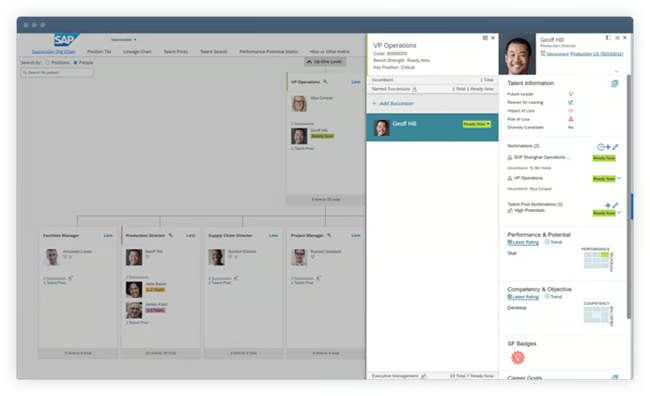
- Succession planning: This tool takes a skills-based approach to developing employees and filling talent pipelines for critical roles. It utilizes the organizational chart and employee profiles to come up with succession planning strategies to nurture high performers, address skills gaps, and identify key positions that have a relatively high impact if they become vacant.
- Enterprise HCM suite across the employee lifecycle: SAP SuccessFactors supports core HR, recruiting, onboarding, performance, learning, and compensation. Compared with Rippling, it is more complex but better suited for large organizations with global operations.
Gallery

Using the AI Assistant, Joule, in SAP SuccessFactors HCM. (Source: SAP) 
Using predictive analytics in SAP SuccessFactors to forecast future hires. (Source: SAP) 
Mobile views of course recommendations in SAP SuccessFactors Learning. (Source: SAP) 
Skills matching in SAP SuccessFactors Recruiting. (Source: SAP) 
SAP SuccessFactors HCM rewards and recognition. (Source: TechnologyAdvice) 
SAP SuccessFactors HCM employee profile. (Source: TechnologyAdvice) 
SAP SuccessFactors HCM homepage. Source: TechnologyAdvice 
View of career site in the SAP Candidate Experience module by Qualtrics. Source: SAP 
View of candidate sentiment analytics in SAP’s Candidate Experience module by Qualtrics. Source: SAP 
Employee engagement analytics charts in SAP Employee Engagement by Qualtrics module. Source: SAP 
Creating a test payroll in SAP SuccessFactors to understand employee data changes. Source: SAP
How is SAP SuccessFactors HCM priced?
Like most enterprise HR software, SAP does not disclose pricing for its full SuccessFactors HCM suite, so you must contact its sales team for a quote. The overall cost is based on the size of your company, the products you need, and the number of administrative users.
However, SAP does reveal the starting price for its SAP Core HR module, which includes time tracking, automated global pay processing, AI-enabled self-services, and a centralized people data management tool. At the time of publication, it costs $18 per month and requires at least 1,000 users and a minimum contract of one year.
Similar to most of the HR software on my list, you can enhance its core platform with add-on features, such as recruitment, workforce management, learning and career development, analytics, and access to its AI assistant, Joule. So if you decide to get SAP SuccessFactors HCM’s entire integrated suite, you may end up paying hundreds of dollars per year per employee.
If you want to negotiate for better rates, I suggest bringing quotes from similar providers. Be sure to ask about discounts when bundling any of its products and services.
Note: SAP SuccessFactors also offers several sales-specific modules, which I did not outline in the chart above. For more information, check out the SAP SuccessFactors HCM website.
What users say about SAP SuccessFactors HCM
“The SAP tool helps to keep rotas and contracts organised, which is vital when managing shift patterns for large workforces, especially when hourly rates are involved.”
Wendy Makinson, HR Manager at Joloda Hydraroll, shares that SAP SuccessFactors HCM works well for their shift-based manufacturing and logistics operations. She says the time and attendance and employee central modules have been especially valuable for keeping rotas and contracts organized.
However, Wendy mentions that initial integration took time—particularly when configuring complex structures like overtime and shift rotations. Now that it’s running smoothly, adding or updating employee data is straightforward, though she’d like to see a simplified interface for shop floor kiosks. Overall, she describes the platform as a positive and reliable HR solution.
Reviewers on G2 and Capterra also consistently praised its scalability and depth of features. Others said that its enterprise-grade suite is sufficient to support the complex HR needs of large, global workforces.
The biggest drawbacks that users raised were about its steep learning curve, limited or overly technical customizations, and dated interface. Some reviewers also reported delays in getting support when resolving advanced issues.
At the time of publication, SAP SuccessFactors HCM reviews earned the following scores on these websites:
- G2: 3.9 out of 5
- Capterra: 4 out of 5
Honorable mention
HR software is a broad and segmented product category. Below are some runners-up that I think performed well in specific categories and may better suit your business’s needs.
Paycor: Best for companies with field and frontline workers
When to choose Paycor
Similar to BambooHR and ADP Workforce Now, Paycor offers an all-in-one HCM platform that caters to the needs of various businesses. It’s ideal for midsized companies, and its mobile and tablet kiosk apps make it optimal for those with frontline and field workers, providing you with multiple options to track their work time and HR records.
Paycor is also the only one in my roundup that allows managers to submit group punches for employees, which is great for deskless employees whose work locations change daily. Pair this with Paycor’s badge, PIN, biometric, or telepunch time clock hardware for stronger time management processes, especially in industries like restaurants and manufacturing.
Why it didn’t make the list
Paycor is a much more dated-looking platform than competitors like Rippling. Much of its data is still formatted like an Excel spreadsheet, increasing the learning curve for small businesses. For example, its pay grid for payroll processing can significantly speed up pay runs for advanced users, but can be very confusing if you’re unfamiliar with payroll.
It can also get pricey, depending on the features you want. Monthly fees aren’t published on its website, and its pricing matrix can be confusing since it offers different plans for small, midsized, and large companies. And while it has a feature-rich platform, the starter package for those with fewer than 49 employees includes only payroll tools. You have to upgrade to higher tiers if you want HR functionalities like onboarding, recruiting, and talent development.
Need help selecting the ideal solution for your business? Check out our article on how to choose the best HR system, including our HR software pricing guide.
Also read:Paid vs Free HR Software: Which is Right For You?
Find your new HR software
HR software types: HRIS vs. HRMS vs. HCM
HR software is the broad category, while HRIS, HRMS, and HCM describe systems with different levels of functionality. An HRIS primarily manages employee records, an HRMS adds operational tools such as payroll and recruiting, and an HCM platform includes strategic capabilities such as workforce planning, learning, and talent development.
Core HR software
A human resources information system (HRIS) offers a variety of capabilities for HR data management. The goal of these multi-function systems is to maintain individual employee data and handle the company’s regulatory and legal employment requirements.
It stores key details about an organization’s workforce, including employees’ personal information, employment details, performance metrics, and compensation history. HRIS platforms can also act as a repository for important HR documents like employment contracts, tax forms, and policy guides.
At its core, an HRIS application focuses on optimizing processes associated with HR record-keeping and reporting. It can be a standalone product that integrates with other HR solutions, or it can serve as a central database in an all-in-one HR software suite.
You can further divide HRIS into five types: operational, strategic, tactical, limited-function, and comprehensive HRIS. To learn more, check out Types of Human Resource Information Systems (HRIS).
A human resources management system (HRMS) focuses on process optimization and cost efficiency. This type of software improves how an organization handles its HR processes by automating tasks and centralizing access to critical information. Many HRMS products extend the functionality of a traditional HRIS by including tools for payroll, benefits administration, recruiting, and performance management. Some HRMS also offer tools for more robust reporting and forecasting purposes, like succession planning and position control.
A human capital management (HCM) software is often regarded as the largest umbrella in the HR software category. Most HCM solutions combine all of the functionalities of HRIS and HRMS platforms, plus additional features for employee engagement, learning management, and business intelligence. It also offers advanced data analysis capabilities for business intelligence and HR process optimization.
HCM software cultivates human capital by streamlining all HR functions and creating a holistic view of the employee lifecycle. This breadth allows companies to maximize the potential of their employees and their contributions to organizational performance. To that end, HCM software adds tactical and strategic HR features to keep employees engaged and motivated to work toward the company’s business goals.
Function-specific HR software
Recruiting
Recruiting software, specifically applicant tracking systems (ATS), help hiring teams optimize the hiring process. It manages the entire recruitment process from beginning to end, from sourcing and screening candidates to extending job offers and onboarding new employees.
ATS platforms manage information related to different candidates, allowing hiring managers to compare candidates against each other and choose the best one for the job. Many recruiting software suites include applicant tracking features in addition to candidate relationship management and workforce planning capabilities.
Onboarding
Onboarding software facilitates the process of introducing new hires to a company. It typically includes capabilities such as electronic signatures, pre-boarding checklists, and employee questionnaires.
Effective onboarding platforms also include tools to help onboard remote employees and onsite workers, such as mobile and desktop support and customizable task assignments by role. That way, all necessary stakeholders timely complete their responsibilities to ensure a smooth employee onboarding experience.
Payroll software
Payroll software lets organizations track expenses, taxes, payouts, and schedules accurately. It also helps HR teams maintain compliance with labor and payroll regulations and analyze payroll data for discrepancies or inefficiencies. Organizations use payroll software to calculate, process, and record employee pay on time.
Payroll software can also come in different sizes and shapes depending on worker classification, company industry, and where employees live and work. For example, you may choose a contractor payroll solution if you only employ contractors. If you employ workers internationally, you’ll want to research global payroll systems to handle competing pay laws by country.
Performance management
Performance management software enables organizations to assess employee skills, track goals, and monitor performance over time. Companies often use performance management software to coach employees and evaluate performance during formal reviews or through weekly pulse updates. It gives managers a clear view of employees’ growth and development in their roles.
Employee engagement
Employee engagement software helps companies understand employee sentiment over time and identify areas where the employee experience can improve. These systems offer survey tools, follow-up workflows, gamification, and analytics to understand how employees feel about their work. Employee feedback data is then consolidated and analyzed to produce actionable insights that can improve retention.
Learning management systems (LMS)
Learning management software or eLearning systems help HR teams design, organize, and deliver employee training programs. These systems can evaluate employee skills, track active certifications, and identify opportunities for professional development.
By incorporating this tool, HR can onboard new employees and keep tenured employees up to date with current industry knowledge standards. Moreover, LMS can optimize job and compliance training and learning and development.
How to choose HR software
To choose HR software, start with the processes you need to improve, then compare platforms based on company size, essential features, integrations, usability, compliance support, and total cost. The best fit should solve your current HR challenges without limiting the business as it grows.
1. Match the software to your company size
Company size often determines how much functionality and flexibility you need. The best HR software for a small business may prioritize affordability, simple setup, payroll, onboarding, and employee self-service. Midsize companies may need stronger reporting, recruiting, performance management, and workflow automation. Enterprises typically require advanced permissions, configurable processes, workforce analytics, and support for multiple locations or countries.
Consider your expected growth as well as your current headcount. A platform that works today could become restrictive if its pricing rises sharply or key features are unavailable at higher employee counts.
2. Identify the HR functions you need
List the tasks your team handles regularly and the problems you want the software to solve. Common HR software features include:
- Employee records and document management
- Payroll and benefits administration
- Recruiting and applicant tracking
- Onboarding and offboarding
- Time, attendance, and scheduling
- Performance management
- Employee self-service
- Reporting and workforce analytics
- Compliance alerts and recordkeeping
Prioritize the functions you will use immediately. Bundling every available module may increase costs and make the platform more complicated than your team needs.
3. Calculate the total cost
HR software pricing may include a base subscription, per-employee charges, implementation fees, and paid add-ons. Look beyond the advertised starting price and compare:
- Monthly platform or account fees
- Per-employee or per-user charges
- Minimum employee requirements
- Setup, migration, and training costs
- Add-ons for payroll, recruiting, benefits, or time tracking
- Annual contracts and cancellation terms
- Price changes as your headcount increases
Request a quote based on your actual workforce and required features. This provides a more useful comparison than relying on each provider’s lowest advertised price.
4. Check integrations and scalability
Confirm that the HR management software connects with the tools your business already uses, such as payroll, accounting, applicant tracking, identity management, and finance systems. Native integrations generally require less maintenance than custom connections or manual file transfers.
The platform should also accommodate new employees, locations, and HR processes without requiring an early replacement. Check whether higher-level features, additional integrations, and international capabilities can be added as your needs change.
How is AI changing HR functions?
Artificial intelligence isn’t just a buzzword in HR tech anymore. It’s changing how core functions operate. While there have been vendors offering HR automation for years, such as automated pay runs, modern AI tools take it further. It can analyze patterns, make predictions, and deliver recommendations across the entire employee lifecycle.
Here are a few areas where AI is showing up in today’s HR platforms:
- Recruiting and talent acquisition: AI is speeding up sourcing and screening. Tools now scan resumes, match candidates to job descriptions, and even suggest interview questions based on the role. For example, SAP SuccessFactors and ADP Workforce Now offer AI-assisted matching tools that help recruiters compare candidate skills with job requirements and identify potentially relevant applicants.
- Performance and engagement insights: AI tools are starting to offer sentiment analysis, eNPS breakdowns, and trend tracking across performance reviews and staff surveys. Platforms like BambooHR include AI-powered summaries of open-text feedback so HR teams can spot issues before they escalate.
- Workforce planning and decision support: HR software like Rippling and SAP SuccessFactors are using predictive analytics to forecast attrition risk, model compensation changes, or flag compliance gaps. These insights allow HR leaders to act proactively instead of reactively.
- Self-service and virtual HR assistants: Some platforms now embed AI chatbots to handle routing employee questions about PTO, benefits, and onboarding paperwork. This frees up HR teams to focus on higher-level or strategic HR work while improving the employee experience.
When comparing AI capabilities, check whether a feature is generally available or still in beta, which plans include it, what workforce data it can access, whether its recommendations are explainable, and where human approval remains part of the process.
AI can make HR administration faster, but employers remain responsible for the employment decisions made with these tools.
For more product-specific examples, see our guide to the best AI tools for human resources.
Frequently asked questions (FAQs) about HR software
What are the benefits of human resources software?
HR software automates repetitive admin work like payroll, onboarding, and benefits tracking, so HR teams can focus on people and not paperwork. It reduces compliance risk, improves data accuracy, and gives leaders real-time insights to make smarter workforce decisions.
How much does HR software cost?
HR software pricing depends on the features you need, the size of your team, and how the vendor structures its plans. Most charge a monthly base fee and a per-employee, per-month rate. For a platform with basic HR features, base monthly fees usually start at around $20 to $40, with per-employee pricing of $6–$15 per month.
Is HR software easy to use?
Some are more intuitive than others. Platforms like Gusto and BambooHR are known for their clean interfaces and guided setup. More robust systems like SAP SuccessFactors offer deeper HR functionality but often require more training and configuration.
Do HR software vendors offer mobile apps?
Yes. Most modern HR software vendors offer mobile apps. These let employees clock in/out, request PTO, or view pay stubs. Managers can also approve requests, track schedules, and access reports on the go. However, some platforms may limit advanced features (like performance reviews or workforce analytics) to the desktop version.